SkyCraft - Play Skyrim as a Minecraft Player
Several games combined into one project, a mashup.
 Links, repository & details
About
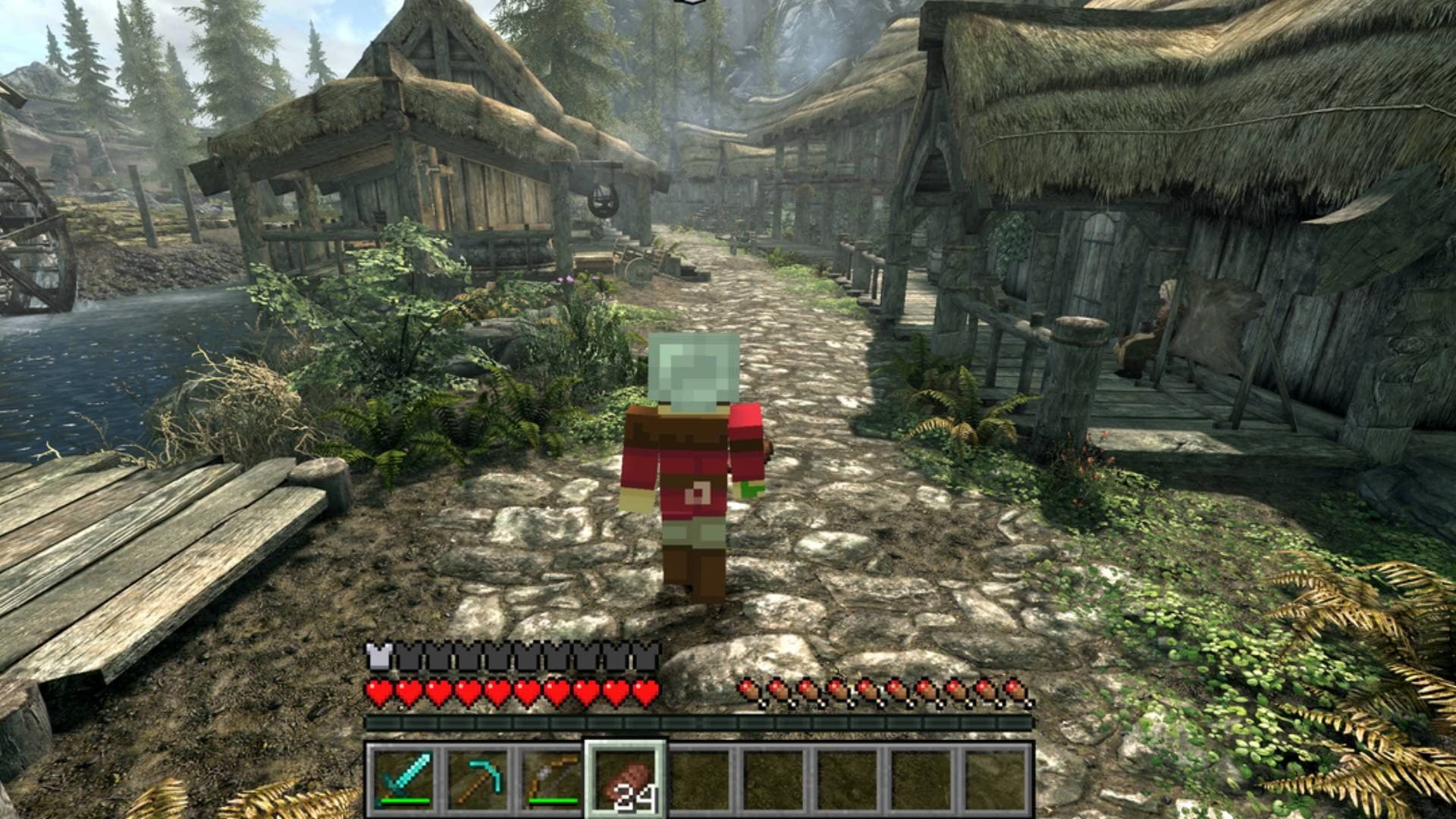
SkyCraft lets you play Skyrim as a Minecraft player: movement uses Minecraft's physics, the inventory and HUD are Minecraft's, and blocks can be placed and broken in Skyrim's world. Neither game is rewritten; a Skyrim SKSE plugin and a Minecraft Fabric mod communicate through shared memory, with Minecraft running hidden in the background while Skyrim draws everything. The README calls it an early and experimental fan project and says both games must be owned.
How it differs from the original
Skyrim skills level up from Minecraft play, Skyrim NPCs can be fought with Minecraft weapons, and Skyrim terrain can be mined like Minecraft blocks. Skyrim's inventory, magic, shouts and perks cannot be opened while Minecraft drives the player.
Getting started
Install the zip with Mod Organizer 2 or Vortex and start Skyrim through SKSE; on first run a Prism Launcher window asks you to sign in. The README strongly recommends the Alternate Start mod because Skyrim's scripted opening may leave you stuck.
Known issues & limitations
- The project is early and experimental; expect rough edges and back up your saves.
- Skyrim's opening cart ride and Helgen may leave you stuck; use Alternate Start or a save made after Helgen.
- Skyrim's inventory, magic, shouts, and perks cannot be opened while Minecraft controls the player.
- Minecraft hits reach NPCs, not Skyrim objects; there is no in-game switch back to plain Skyrim yet.
- Sign text is not drawn yet.
- All Skyrim interiors share one Minecraft world, so blocks placed in one interior can appear in another at the same coordinates.
- Multiplayer syncs only the Minecraft world; guests cannot hit their own Skyrim NPCs yet.
- Improved Camera SE, SmoothCam, and True Directional Movement conflict because they also take over the camera.
What you need to run it
Features
- Place and break blocks in Skyrim; Minecraft lights illuminate Skyrim.
- Water and lava flow over Skyrim terrain, and Skyrim water behaves like Minecraft water for swimming.
- Fight Skyrim NPCs with Minecraft weapons; NPCs fight back.
- Minecraft F5 camera modes show your skin and armor in Skyrim.
How to install
- Install the SkyCraft zip with Mod Organizer 2 or Vortex, like an SKSE plugin.
- Start Skyrim through SKSE; on first launch, sign in to Microsoft in the Prism Launcher window and return to Skyrim.
- To update, install the new SkyCraft zip over the old one; the next start updates Minecraft and keeps your sign-in and world.
Controls
- G activates Skyrim doors, NPCs, containers, levers, and furniture.
- Esc opens the Skyrim menu or closes an open Minecraft screen.
- O opens the Minecraft pause and options menu.
Summarised from the project's README.
Additional notes
- Multiplayer
- Friends who also run SkyCraft can join your Minecraft world over the internet, with up to 100 players, but only the Minecraft world is shared.
- Conflicts
- Mods that also take over the camera, such as Improved Camera SE, SmoothCam and True Directional Movement, will conflict.
FAQ
- What is SkyCraft - Play Skyrim as a Minecraft Player?
- SkyCraft - Play Skyrim as a Minecraft Player is an open-source mashup. Several games combined into one project, a mashup.
- Do I need the original game files to run SkyCraft - Play Skyrim as a Minecraft Player?
- Yes. The project does not include the original game's assets, so you need your own copy.