Ace Combat 6: Fires of Liberation Recompilation
The original game's compiled code translated into a native program for a new platform, usually a PC port.
Based on Ace Combat 6: Fires of Liberation
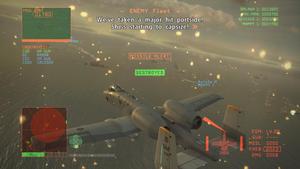
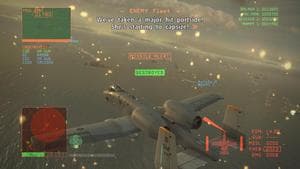 Original game image
About
A native PC port of Ace Combat 6: Fires of Liberation built on the ReXGlue SDK, where the Xbox 360 PowerPC game code is statically recompiled to x86-64. The README marks it as work in progress: it can boot and run in-game, but bugs, crashes and missing functionality are to be expected. It targets 64-bit Windows 10 or 11 with an AVX2-capable CPU and a Direct3D 12 GPU.
How it differs from the original
The README lists frame rates above the stock 30 FPS, terrain drawn at the full resolution shipped on the disc, resolution scaling, optional ultrawide support, Japanese language support, keyboard and mouse controls modelled on Ace Combat 7, and texture replacement modding. Most of these are controlled by settings in a config file.
Getting started
You must supply your own legally obtained copy of the game, US region only according to the README. Place either the ISO or a folder of extracted files next to ac6recomp.exe, optionally add extracted DLC in a dlc folder, and run the executable. Keyboard and mouse are off by default and are enabled with a setting.
Known issues & limitations
- The project is a work in progress; bugs, crashes, and missing functionality are expected.
- Performance is a known issue; a powerful GPU is recommended for 60 FPS at high resolution.
- With ultrawide enabled, in-engine cinematics can expose set edges because they are staged for 16:9.
What you need to run it
Features
- The game can run at up to 60 FPS, with the flight model corrected.
- Terrain is drawn at the full resolution shipped on the disc, and mountain cracks and seams are removed.
- Optional hor+ widescreen is available in missions and cutscenes.
- Keyboard and mouse controls include mouse steering and remappable bindings that reload from a config file.
- Controllers work out of the box, including a virtual pad when none is connected.
- Japanese language support is available.
How to install
- Get a build by downloading a release.
- Place either the game's ISO image or an `assets/` folder of extracted game files next to `ac6recomp.exe`.
- Optionally place extracted DLC packages in a `dlc/` folder next to the executable.
- Run `ac6recomp.exe`; it creates `ac6recomp.toml` beside the executable on first run.
Controls
- Press F3 to toggle the FPS overlay, F4 to open the settings overlay, and F11 to toggle fullscreen.
- Enable keyboard and mouse controls by setting `ac6_kbm_enabled = true`; they are off by default.
- The mouse steers the aircraft; hold Left Alt to look around instead.
- Arrow keys issue wingman commands.
- Menus use W/A/S/D or arrow keys to navigate, Space or Mouse1 to confirm, and Escape, Backspace, or Mouse2 to cancel.
Summarised from the project's README.
Additional notes
- Performance
- The README says performance is a known issue because a native renderer is not yet implemented, so a powerful GPU is recommended for 60 FPS at high resolution.
- Regions
- Europe and Japan releases of the game are stated as not supported.
- In game keys
- F3 toggles an FPS overlay, F4 opens a settings overlay and F11 toggles fullscreen.
FAQ
- What is Ace Combat 6: Fires of Liberation Recompilation?
- Ace Combat 6: Fires of Liberation Recompilation is an open-source recompilation of Ace Combat 6: Fires of Liberation. The original game's compiled code translated into a native program for a new platform, usually a PC port. The original game ran on Xbox 360.
- Do I need the original game files to run Ace Combat 6: Fires of Liberation Recompilation?
- Yes. The project does not include the original game's assets, so you need your own copy.