Super Mario Advance 2: Super Mario World Recompilation
The original game's compiled code translated into a native program for a new platform, usually a PC port.
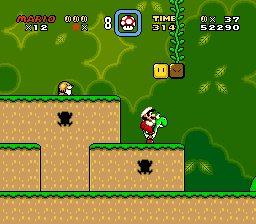
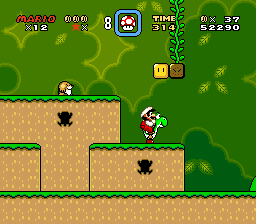 Original game image
About
A static recompilation of Super Mario Advance 2: Super Mario World for Windows that runs the original Game Boy Advance game as a native desktop application. The README labels it an experimental preview and a byproduct of developing gbarecomp, and says the v0.0.3 build boots and runs through the opening and attract sequence.
How it differs from the original
It includes an optional Adaptive Widescreen mod, disabled by default, that renders extra content at the sides instead of stretching the 240x160 image; supported gameplay scenes can expand up to 9:5.
Getting started
The README says the game ROM and GBA BIOS are not included and you must provide your own legally obtained dumps. Download the Windows zip, run SuperMarioWorldRecomp.exe and select your Super Mario Advance 2 (USA/Australia) ROM and retail GBA BIOS in the launcher, then press Play.
History
The README describes the recompilation as a byproduct of developing gbarecomp, with the games as the proving ground for the framework.
Known issues & limitations
- This is an experimental preview, not a finished commercial port, so rough edges are expected.
- The game currently boots and runs through its opening and attract sequence.
- Widescreen work is still being refined scene by scene.
- Some scenes keep the original view when the game does not prepare enough off-screen level or actor data.
What you need to run it
Features
- You can play in windowed or fullscreen mode and configure presentation.
- The game has an in-game settings menu.
- The project supports cartridge saves and save states.
How to install
- Download the Windows zip from Releases and extract it.
- Run SuperMarioWorldRecomp.exe.
- In the launcher, select your game ROM and retail GBA BIOS.
- Configure display, audio, controls, and mods, then select Play.
- After setup, the launcher remembers valid files; enable Skip launcher on boot to launch directly into the game later.
Controls
- Use the arrow keys for the D-Pad, X/Z for A/B, Enter for Start, Right Shift for Select, and C/V for L/R.
- Use Shift+F1–F9 to save a state and F1–F9 to load one.
- Controls can be changed from the launcher.
Summarised from the project's README.
Additional notes
- Features
- Keyboard and game-controller support, cartridge saves, and save states on Shift+F1-F9 and F1-F9.
FAQ
- What is Super Mario Advance 2: Super Mario World Recompilation?
- Super Mario Advance 2: Super Mario World Recompilation is an open-source recompilation of Super Mario Advance 2: Super Mario World. The original game's compiled code translated into a native program for a new platform, usually a PC port. The original game ran on Game Boy Advance.
- Do I need the original game files to run Super Mario Advance 2: Super Mario World Recompilation?
- Yes. The project does not include the original game's assets, so you need your own copy.
- How is Super Mario Advance 2: Super Mario World Recompilation licensed?
- project: PolyForm Noncommercial 1.0.0 (project code). The repository itself is the authoritative source.