Animal Crossing Port
An existing game or its source code brought to another platform.
Based on Animal Crossing
compare all 6 clones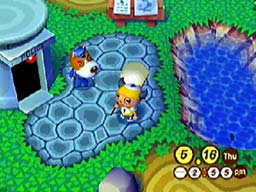
 Original game image
About
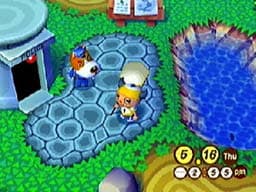
A native ARM port of the Animal Crossing (GameCube) decompilation for Anbernic H700 handhelds running muOS, Knulli or other PortMaster-capable systems. It is not emulation: the decompiled C code runs directly on the handheld's CPU, and a translation layer maps the GameCube's GX graphics API onto OpenGL ES 3.2. It supports the USA GAFE01 Rev 0 version and runs at about 56 fps on the RG-34XX SP (v0.3.0).
How it differs from the original
The in-game NES emulator does not exist in this port, so NES furniture shows a message that there is no software. PAL and Japanese discs are refused, and the Deluxe mod does not work yet.
Getting started
Download the release zip, copy the ports folder to the root of the SD card and Animal Crossing.sh into ROMS/Ports/. Put your own legally dumped USA Animal Crossing disc image (.iso, .gcm or .ciso) into ports/ac-gc/rom/ and launch it from the Ports menu. The first launch is slower while the shader cache is built.
Known issues & limitations
- The project is actively developed and has not yet been tested end-to-end; expect rough edges and save often.
- Older RG35XX models and RK3566 devices are not expected to work.
What you need to run it
Features
- Settings include FPS target, render scale, graphics quality, volume, and bindings.
- Saves use standard GCI format and are compatible with Dolphin in both directions.
- Dolphin-format texture packs are supported; the community HD pack works but costs performance on handheld GPUs.
- The project reports about 56 fps average at full game speed on the RG-34XX SP, with dips into the low 40s during heavy acre streaming.
How to install
- Download the release zip and unzip it on a computer.
- Copy the `ports` folder to the SD card root and `Animal Crossing.sh` to `ROMS/Ports/`.
- Put your USA GAFE01 game image in `ports/ac-gc/rom/`.
- Safely eject the card, put it back in the device, power on, and launch the game from the Ports menu.
- The first launch takes longer while the game builds its shader cache.
Controls
- For stickless controllers, current builds enable D-pad walking automatically; older builds can enable it in Select → Control → “Use Dpad as Joystick.”
- On modded stock OS, Menu/Function opens settings and Select+Start exits.
Summarised from the project's README.
Status & roadmap
- It is actively developed and not yet tested end to end, so frequent saving is advised.
AI assistance
- AI tools (Claude) were used in the porting and optimization work, on platform code only and not on the decompiled game code.
Additional notes
- Saves
- Saves use the GCI format and are Dolphin-compatible in both directions.
FAQ
- What is Animal Crossing Port?
- Animal Crossing Port is an open-source port of Animal Crossing. An existing game or its source code brought to another platform. The original game ran on Other.
- Do I need the original game files to run Animal Crossing Port?
- Yes. The project does not include the original game's assets, so you need your own copy.
- Can I use the European (PAL) or Japanese disc?
- No. The port targets the USA GAFE01 version; PAL and Japanese discs are refused at launch.
- How much RAM?
- It runs comfortably on both 2GB and 1GB devices.
- Can I play on Desktop Linux or PC?
- The upstream project targets Desktop Linux / PC; this fork focuses on H700 handhelds.
More like Animal Crossing Port
Original game image Original game imageOriginal game image